Public Function functionName (Arg As dataType,..........) As dataType
or
Private Function functionName (Arg As dataType,..........) As dataType
* Public indicates that the function is applicable to the whole project and
Private indicates that the function is only applicable to a certain module or procedure.
Example
In this example, a user can calculate the future value of a certain amount of money he has today based on the interest rate and the number of years from now, supposing he will invest this amount of money somewhere .The calculation is based on the compound interest rate.
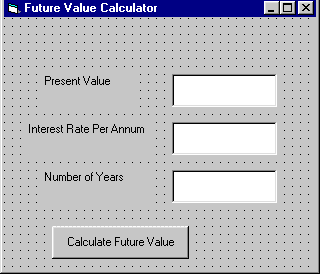
The code
Public Function FV(PV As Variant, i As Variant, n As Variant) As Variant
'Formula to calculate Future Value(FV)
'PV denotes Present Value
FV = PV * (1 + i / 100) ^ n
End Function
Private Sub compute_Click()
'This procedure will calculate Future Value
Dim FutureVal As Variant
Dim PresentVal As Variant
Dim interest As Variant
Dim period As Variant
PresentVal = PV.Text
interest = rate.Text
period = years.Text
'calling the funciton
FutureVal = FV(PresentVal, interest, period)
MsgBox ("The Future Value is " & FutureVal)
End Sub

No comments:
Post a Comment